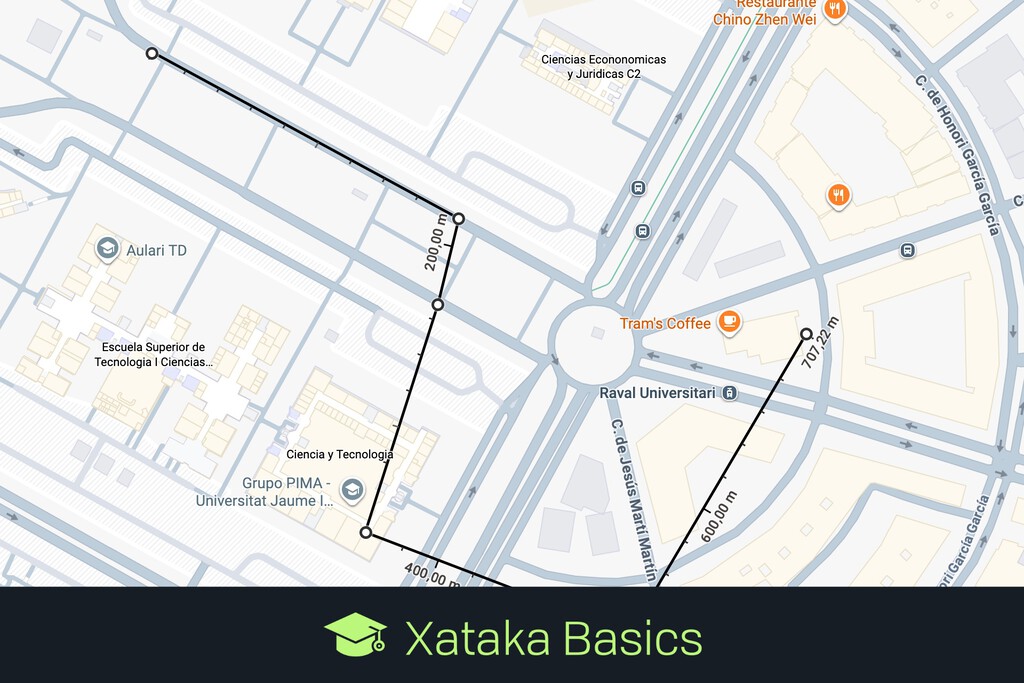
Navigation apps have largely conditioned users to think in terms of logistics — calculating the time and fuel required to traverse a pre-defined road network. Yet space exists independently of infrastructure. Google Maps contains a persistent, if understated, "Measure distance" tool that strips away the constraints of turn-by-turn directions, allowing anyone to calculate the literal straight-line distance between any two coordinates on the planet. The feature has been available on both web and mobile platforms for years, yet it remains one of the least discussed utilities in the most widely used mapping application in the world.
The tool's existence is a quiet reminder that digital maps descend from a tradition far older than ride-hailing and delivery logistics. Before Google Maps launched in 2005, cartography's central promise was not route optimization but spatial representation — the faithful rendering of physical distances, elevations, and boundaries onto a legible surface. The "Measure distance" function is, in a sense, the vestigial organ of that original purpose.
From Navigation to Surveying
On the web interface, the process is minimal. A right-click on any point on the map presents the measurement option, after which the user can plot a series of additional points to calculate the cumulative distance of a custom path. The result is a raw geometric reading — no algorithm selecting the fastest highway, no estimated arrival time, no toll warnings. For urbanists, architects, runners plotting training routes, or anyone curious about the actual dimensions of a landscape, the tool converts a consumer navigation product into something closer to a digital surveyor's tape.
On mobile devices, the interaction follows a similar logic. Dropping a pin and selecting the measurement option allows users to navigate the map and plot a trajectory point by point. The interface is stripped down compared to the driving or transit modes that dominate the app's home screen, which may explain why many regular users have never encountered it. There is no promotional nudge, no onboarding tutorial. It simply exists for those who look for it.
The distinction between this tool and standard directions is worth underscoring. Turn-by-turn navigation answers a logistical question: how does one get from point A to point B given the existing road network? The measurement tool answers a geometric one: how far apart are these two locations in physical space? The former is constrained by infrastructure — roads, bridges, one-way streets. The latter ignores all of it, offering what is sometimes called the "as the crow flies" distance.
The Map Before the Algorithm
This difference matters more than it might initially appear. The dominance of algorithmic routing in modern mapping applications has subtly reshaped how people perceive geography. Cities are experienced as networks of optimal routes rather than as continuous physical spaces. Two neighborhoods separated by a river may feel distant because the nearest bridge adds minutes to a commute, even if the straight-line distance between them is negligible. The measurement tool corrects for this perceptual distortion, restoring a sense of actual spatial proportion.
The broader context is one in which mapping platforms have become infrastructure in their own right — shaping real estate decisions, delivery economics, urban planning, and commuting patterns. When the primary interface to geography is an algorithm optimized for travel time, the underlying physical reality can recede from view. A tool that reasserts raw distance, however modest in design, serves as a counterweight.
Whether this feature will ever move beyond its current niche is an open question. Mapping applications face persistent commercial incentives to foreground routing, advertising, and local business discovery — functions that generate revenue. A simple ruler generates none. The tension sits between the map as a commercial platform and the map as a faithful representation of the physical world. Which version users encounter depends, in large part, on which features the interface chooses to surface — and which it leaves buried behind a right-click.
With reporting from Xataka.
Source · Xataka